Tuesday, February 14, 2017

Using Technology to Make Essential Questions an Essential Part of Instruction (updated post)


In an extremely thoughtful and well-written post, On genuine vs. bogus inquiry, Grant Wiggins writes

Merely posting the EQs and occasionally reminding kids of it is pointless: the aim is to use the question to frame specific activities, to provide perspective and focus, to prioritize the course, and to signal to students that, eventually, THEY must - on their own - pose this and other key questions.

My understanding and application of Essential Questions has developed over time. As a teacher who was asked to post EQs daily and include them in lesson plans without any instruction as to why or how to do that effectively, I felt that EQs were a waste of time and just another thing to do. Later, as an instructional coach, I worked to help teachers write EQs that were aligned with their content standards and learning outcomes. Early on, my focus was on wording the EQs well. Eventually, I came to understand that EQs are meaningless unless they are used during instruction. The purpose of EQs is to help both the teacher and students focus on key content and develop the ability to ask and answer meaningful questions about content and processes. I encourage in-service and pre-service teachers I work with to ask EQs aloud at the start of a lesson, during the lesson, and again at the end. An EQ should frame the lesson or unit of instruction and provide a context for the learning to happen. EQs give students a learning outcome to work toward and should allow learners to respond in multiple ways over time. Keep in mind that students should not be able to answer an EQ with one word. EQs should prompt a thorough response to demonstrate depth of understanding.

Let me digress for a moment...

Attention is a necessary prerequisite of learning. Educators have to find a way to help students attend to important content. Selective attention involves the ability to choose where to focus your attention. Today's students are bombarded with stimuli and often need help attending to what's important. We also need to help students develop strategies for self-regulating their attention. Check your classroom environment. Is there a chance that your classroom is too stimulating for some students? Work to remove distractions. I encourage you to try these auditory and visual attention tests to experience what it's like for some students to attend when there are distractions in the environment.

After reading Wiggins' post, I immediately started to think through how technology can support teachers in making EQs meaningful. Below are some tools to help you integrate EQs into teaching and learning in your classroom and help you view them as more than just "one more thing to do".


    Use Canvas to connect assignments, discussions, and content to EQs. First, add your EQs as learning outcomes, and then import those outcomes to rubrics to explicitly connect assignments and discussions with EQs. Once you connect outcomes to rubrics, the Learning Mastery Gradebook in Canvas allows you to easily track student progress toward learning outcomes. 

Use Google Classroom to post EQs and have students compose responses and engage in ongoing conversation around the EQs. You can also label assignments with specific EQs to help students make a connection between learning outcomes and tasks.


Use Flipgrid to create a video-based discussion focused on an EQ. Create a new topic and pose the EQ as either a text or video prompt. Students can use flipgrid.com or the free mobile app to post a short video reply (up to 3 minutes). Encourage students to reply to one another's initial videos to deepen the conversation. You can provide video or text feedback on each student's reply and use Flipgrid's rating scale to evaluate the thoughtfulness of student responses.


Socrative allows teachers to create individual or team-based quizzes containing open-ended, true/false, or multiple-choice questions. Students can respond through any device. Use Socrative to find out what students know before a lesson or unit of instruction. Use the stand-alone question feature to ask an EQ throughout a unit of instruction and get instant feedback. Students feel safe to respond anonymously and don't risk looking foolish in front of their peers.


Poll Everywhere provides a simple platform for asking EQs and allowing students to respond through any device. Set up an open-ended poll and allow students to respond prior to, during, and after a unit of instruction or learning experience.


Use Padlet to pose questions and have students respond by posting sticky notes to a wall you've created. Padlet allows students to add text, images, videos, or hyperlinks to their sticky note responses. Students can also take the lead on posting questions and prompts for their peers.


Host a Twitter chat using a classroom-specific hashtag focused on the EQ for your unit of instruction. Pose the EQ at the start of the conversation, and encourage students to respond to you and one another. Work toward releasing ownership to students by asking them to pose questions and moderate chats. View chat archives to see how students' understandings have developed over time.


Blogs allow for more thorough and developed responses to EQs than other tools I've mentioned here. Students can include a variety of media in their blog posts. Encourage students to comment on classmates' posts to challenge and extend their thinking with regard to the EQ.


Keeping in mind what we know about attention and learning, think about how helpful it is for your students when you give them cues that help them focus on and attend to key information. Essential questions are one approach, and these technology tools can help you use EQs in meaningful ways to deepen students' understanding of key content. What other strategies do you use to help students attend in your classroom? What other tech tools can you use to integrate EQs meaningfully?


Tuesday, April 19, 2016

Technology for Formative Assessments: Updated Post

In 2012 I wrote a blog post about using technology for formative assessments. It has been my post popular blog post by far, with over 14,000 views. Over the past few years, technology has continued to evolve and has made it even easier for educators to embed formative assessments into instruction and be immediately responsive to student learning needs. Today, I have updated my original post to include what I believe to be some of the most promising practices and tools for formative assessments.  

In my experience, teachers tend to rely more heavily on summative assessments (assessment OF learning) than formative assessments (assessment FOR learning). There is power in formative assessments and their ability to inform instruction and improve student learning. Take just a moment to reflect: How often do you go through this process?

1. Give end-of-chapter tests, unit tests, vocabulary quizzes, etc.
2. Record the grades.
3. Return the papers.
4. Move on.

Who benefits from this summative assessment process? No one. What if, instead, you give an assessment BEFORE the unit to determine what students already know and don't know and DURING the unit to track learning progress and make teaching adjustments? This formative assessment cycle feeds into planning and instruction and has much more meaning for both teacher and students.

Last semester, my pre-service teachers and I were discussing formative and summative assessments. I gave them a short quiz using Socrative and asked them to determine whether they would identify various assessment formats as formative or summative. Their results were mixed, which led to a meaningful conversation about what makes an assessment formative or summative. Through the discussion, my students came to realize that whether an assessment is summative or formative depends on what the teacher does afterward. Can a chapter test be formative? Absolutely, if the teacher uses the results to identify gaps in understanding and provide instruction to help students meet learning goals for the chapter. Can a pre-test be summative? You bet, if the teacher doesn't change his/her plans for instruction based on data from the test.

The beauty of formative assessments is that they can be informal and easy to implement. A formative assessment can be as simple as a ticket out the door or asking students to hold up 1, 2, or 3 fingers depending on their understanding of the lesson. Technology can make the formative assessment process even easier and provide tools for analyzing data quickly and painlessly. There are many free web tools that allow teachers to create and deliver formative assessments in just a few minutes and collect student results instantly. Keep reading to learn about a few of my favorites.


Formative

Formative has recently become the assessment tool I recommend most frequently due to its capacity to transform feedback from one-way communication into a two-way conversation. As with many online assessment tools, Formative allows teachers to design assessments that include a variety of question types and embed multiple types of content, including images and videos. However, there are a couple of great features that set Formative apart from the crowd. One time-saving feature allows you to upload an existing document and transform it to an online formative assessment with just a few clicks. This feature enables teachers to convert existing paper-based assessments, including handouts, graphic organizers, and other documents, into digital assessments with online data analysis capability. Teachers love this time-saving feature that prevents them from having to recreate an existing assessment in order to transform it to a digital assessment. 

But wait... there's more! The truly transformative thing about Formative (see what I did there?) is the ability for teachers to provide instant, real-time feedback on student responses while students are engaged with the assessment. Before a student even submits a response, the teacher can track the response in real time and provide feedback that immediately becomes visible to the student. During the assessment, the student can reply to the teacher's feedback and engage in a conversation about the work. By monitoring student responses on the assessment dashboard, a teacher can see how each student is responding and provide feedback to multiple students in real time.  This type of functionality can enable teachers to design truly personalized learning environments, where each student receives the instruction he or she needs at the precise moment of need.


Nearpod

Nearpod is not solely an assessment tool, but it includes great potential for formative assessment. One of the best things about Nearpod is the ability for teachers to seamlessly embed formative assessments into instruction. When I work with pre-service and in-service teachers on ideas around formative assessment, I refer to teachers as potters at a potters wheel, with two hands that work together to shape student learning. One hand is the instruction hand, while the other is the assessment hand. A potter doesn't stop using one hand while using the other. Similarly, master teachers don't stop teaching to assess, and stop assessing to teach. Nearpod is a tool that allows teachers to use both hands to seamlessly assess student learning and then use student responses to immediately adjust instruction. To do this, Nearpod allows teachers to embed assessment items (multiple choice, short answer, annotation) into a presentation that can include a variety of content types (text, images, videos, websites). During a Nearpod lesson, the teacher can track each student's response as well as track overall class progress. An additional feature allows the teacher to push a student's response out to all devices anonymously for analysis and discussion.

One way Nearpod can facilitate a shift toward student-driven, personalized learning is through use of the Homework feature. The traditional Nearpod lesson feature is teacher-paced. However, the Homework feature allows students to control the pace, reviewing and interacting with content as often as needed to master learning outcomes. The Homework feature can also enable you to "clone" the teacher by pushing out different lessons to different students and/or groups of students. For example, while the teacher works with a small group, the rest of the class can be working on personalized Nearpod lessons with embedded formative assessments. Imagine several different student groups simultaneously each engaging in unique, interactive lessons designed specifically for them while controlling the pace of their learning. While teaching a small group lesson, the teacher can also monitor student responses from other lessons and make immediate adjustments to instruction. 


Socrative

Socrative has been my go-to online assessment tool for several years. This free web tool has lots of capability and works across devices. Teachers can create self-paced quizzes, exit tickets, and quiz games, or deliver stand-alone multiple-choice, true/false, or short answer questions. Students respond to questions using a computer, tablet, or phone. A variety of devices can be used during any given assessment. My favorite Socrative feature is the report that is generated immediately following each assessment. Each assessment generates a detailed report automatically and instantly. Teachers can download reports or have them sent via email. Learn more and get some great ideas by visiting the Socrative Garden.


Plickers

Plickers is a low-tech formative assessment option that enables teachers to gather and analyze student responses in real time when student devices are not available. Most digital formative assessment tools require that students have access to devices, either individually or in small groups. With Plickers, only the teacher needs a device. Students respond to multiple-choice items by holding up cards that can be purchased or printed from the Plickers site. As students hold up their cards, the teacher scans the room with a mobile device, instantly collecting individual and whole-class data. A teacher can deliver a Plickers assessment in a minute or less, gathering real-time information about student understanding in time to immediately adjust instruction.  


Kahoot

Kahoot is a game-based assessment tool that appeals to students who love competition. To play Kahoot, students visit kahoot.it on their mobile devices and join the assessment using a code distributed by the teacher. Points are awarded for accuracy and speed, which turns a formative assessment into a fast-paced game. I have used Kahoot with elementary students, college freshmen, and adult learners, and it's always a fun experience. As with the other tools shared in this post, Kahoot provides teachers with the ability to quickly gather information about student learning and use that data to make adjustments to instruction. 


Poll Everywhere

Another assessment tool I use regularly (with my pre-service teachers and during professional development for in-service teachers) is Poll Everywhere, a free polling site that allows you to poll the audience with multiple-choice or open-ended questions. Students can respond via SMS, Twitter, http://pollev.com, or a private link. As you create a poll, you choose how you would like to receive responses. You can give students a few options or narrow their choices to one or two. When you display the poll, on-screen instructions will assist students with responding. Poll Everywhere saves your previous polls so you can review past results at any time. Following a poll, you can instantly generate a word cloud from responses. You also have several options for displaying your questions: embed in a blog or other website, share via Twitter or Facebook, share a live link, embed in PowerPoint, or download for Prezi.


Google Forms

Google Forms are my personal favorite among the types of Google Docs available to Gmail users. Google Forms allows you to quickly create an assessment with a variety of question types: multiple choice, short answer, checkboxes, choose from a list, scale, and grid. You can deliver an assessment via Google Forms by sending the Form through email, sharing the link, or embedding it into a website. The ultimate feature is that Google automatically generates a spreadsheet upon creation of a Form. As soon as you create and save the Form, Google Docs adds a spreadsheet to your Docs list. Each time someone fills out the form, a new row is entered into the spreadsheet containing that individual's responses. Data within the spreadsheet can then be sorted and analyzed quickly and easily. You can also view a summary of responses with just one click, which provides percentages and circle graphs of data collected. If you're interested in using Google Forms for formative assessments, be sure to check out Flubaroo, a script that will enable Google Docs to automatically grade responses to your assessments.


Padlet

Padlet is another great choice for informal formative assessments. Teachers create a wall, post one or many questions or prompts, and share the link with students who then post their responses to the wall as sticky notes. Teachers have the option to moderate responses, which keeps all sticky notes hidden until approved by the teacher. Sticky notes can contain text, images, video, and links. These media options allow teachers to post image or video prompts or direct students to a website. Students can also include these different types of media in their responses, allowing them to respond creatively. Padlet works great as an exit ticket, a warm-up activity, a status-of-the-class, or a progress check. 

Each of these free web tools enables a teacher to create an assessment within just a few minutes, deliver the assessment through a variety of devices and platforms, collect data instantly, and analyze results to inform future instruction. While these are my top choices, there are many other web tools that would be a good fit for formative assessments. Please leave a comment and tell me about your favorite technology for formative assessments. 

Sunday, February 14, 2016

Rethinking School: A Conversation for Digital Learning Day 2016

Watch the live feed scheduled for Wednesday, February 17th at 10:00 am ET

Wednesday, January 13, 2016

Using Video to Orient Students to a New Semester

Each semester, I rely heavily on the use of video to orient students to a new semester. Orientation videos, demos, and tutorials can help ease students into a new semester, particularly in online courses, and prevent this reaction in students. The start of the semester certainly isn't the only time it's beneficial to use video, but I've come to realize that the time it takes to create these videos early in the semester pays off in huge ways.

Below, I share a few videos I created over the past week in preparation for the start of the spring semester. I use Camtasia or Snagit for nearly all video creation. However, you will notice that one of the videos below was created using Screencast-o-matic, as my Camtastia software needed to be updated at the time.


course orientation video


course orientation video


explanation of using playlists for blended learning, created for my student teachers in blended classrooms


demo of Diigo Groups for resource-sharing and discussion

Monday, May 18, 2015

Preparing Teaching Candidates for Blended and Online Environments

This post was originally written by Jayme Linton for Fractus Learning. Read the original post here.
There is a growing need for today’s pre-service teachers to be equipped with skills and competencies for blended, online, and technology-rich teaching and learning environments. As teaching candidates progress through teacher education programs, they should be exploring,evaluating, and applying methods and tools for effective instruction in the dynamic learning environments that exist in today’s K-12 schools.
At Lenoir-Rhyne University in Hickory, North Carolina, faculty in the School of Education have developed pathways to help teaching candidates gain experience exploring, evaluating, and applying methods for online and blended instruction. Elementary, middle grades, and secondary teaching candidates at Lenoir-Rhyne University have the option of pursuing a track in blended or online learning as part of their teacher preparation program. We believe that graduates from these programs are better equipped to meet the needs of today’s learners and adapt to changing teaching and learning environments.
There are multiple opportunities to assist pre-service teachers in developing competencies for blended and online instruction, including modeling, coursework, and field experiences. In this post, I share the pathways we have developed at Lenoir-Rhyne University to prepare our teaching candidates for the field in the hopes that these structures and methods can be adapted by other teacher education programs.

Purposeful Modeling

Secondary education majors in Lenoir-Rhyne’s Master of Arts in Teaching program are presented with the opportunity to obtain a graduate certificate in online teaching and instructional design through a combination of coursework and field experiences. Students pursuing the online teaching track complete coursework in online methodsinstructional design, technologies for online learning environments, and foundations in distance education. Undergraduate elementary and middle grades education majors have the opportunity to begin graduate coursework in blended learning during their senior year. These courses include blended methods and technologies for blended learning environments.
Courses in blended and online learning, instructional design, and technologies for blended and online learning are taught by full-time faculty who model effective blended and online methods in their courses. This purposeful modeling is designed to help teaching candidates bridge theory and practice. Teaching candidates graduating from a blended or online teaching track will have experienced effective blended and online methods from both a student and teacher perspective.

Experience and Mentoring

In addition to coursework in blended and online methods, Lenoir-Rhyne University teaching candidates also have the opportunity to complete a blended or virtual student teaching experience, allowing them to apply methods from their coursework in authentic K-12 settings. This opportunity is made available due to collaborative partnerships with local school districts and the North Carolina Virtual Public School (NCVPS). These partnerships allow Lenoir-Rhyne University School of Education faculty to match teaching candidates with mentor teacherswho are currently teaching in blended and online settings.
Elementary and middle grades teaching candidates pursuing the blended learning pathway complete a blended practicum in a local school district, designing and facilitating face-to-face and online instruction under the supervision of a mentor teacher and university supervisor. The blended practicum allows teaching candidates to develop flexibility and fluency with methods for diverse teaching and learning environments.

In The Field

Teaching candidates pursuing the online teaching track at the secondary level complete a year-long traditional, brick-and-mortar residency in a local classroom as well as a semester-long virtual practicum with an online course through NCVPS. In the virtual practicum, teaching candidates complete an online student teaching experience similar to traditional student teaching, whereby candidates take on teaching responsibilities for a specific period of time. The virtual practicum allows future secondary teachers to gain real experience designing and facilitating online learning experiences for diverse students from across the state. These blended and online field experiences are essential for today’s future educators.
Research on preparation for blended and online instruction advocates for coursework and practica focused on effective methods for designing and facilitating instruction in such environments (Journell et al., 2013; Kennedy & Archambault, 2012a). However, most teacher education programs have yet to provide these learning experiences for teaching candidates, thereby failing to adequately prepare them for their futures in the profession (Barbour et al., 2013). At Lenoir-Rhyne University, we have designed and implemented learning pathways to prepare teaching candidates for effective blended and online instruction. It is my hope that bysharing our approach to teacher preparation for blended and online instruction, other teacher educators will envision possibilities for incorporating components of blended and online learning into their courses and programs to better prepare teaching candidates for their futures.
To learn more about the blended and online teaching pathways at Lenoir-Rhyne University, contact Assistant Professor and Program Coordinator Dr. Jayme Linton at jayme.linton@lr.edu.

References

Barbour, M. K., Siko, J., Gross, E., & Waddell, K. (2013). Virtually unprepared: Examining the preparation of K-12 online teachers. In R. Hartshorne, T. L. Heafner, & T. M. Petty, (Eds.), Teacher education programs and online learning tools: Innovations in teacher preparation (pp. 120-143). Hershey, PA: IGI Global.
Davis, N. E. & Roblyer, M. D. (2005). Preparing teachers for the “schools that technology built”: Evaluation of a program to train teachers for virtual schooling. Journal of Research on Technology in Education, 37(4), 399-409.
Duncan, H. E., & Barnett, J. (2009). Experiencing online pedagogy: A Canadian case study. Teaching Education, 21(3), 247-262.
Ferdig, R. E., Cavanaugh, C., Dipietro, M., Black, E. W., & Dawson, K. (2009). Virtual schooling standards and best practices for teacher education. Journal of Technology and Teacher Education, 17(4), 203-226.
Journell, W., Beeson, M. W., Crave, J. J., Gomez, M., Linton, J. N., Taylor, M. O. (2013). Training teachers for virtual classrooms: A description of an experimental course in online pedagogy. In R. Hartshorne, T. L. Heafner, & T. M. Petty, (Eds.), Teacher education programs and online learning tools: Innovations in teacher preparation (pp. 120-143). Hershey, PA: IGI Global.
Kennedy, K. & Archambault, L. (2012a). Design and development of field experiences in K-12 online learning environments. The Journal of Applied Instructional Design, 2(1), 35-49.
Kennedy, K. & Archambault, L. (2012b). Offering preservice teachers field experiences in K-12 online learning: A national survey of teacher education programs. Journal of Teacher Education, 63(3), 185-200.
Malin, G. G. (2010). 21st century fieldwork: How pre-service teachers connected theory and practice in a hybrid high school setting. Journal of Online Learning and Teaching, 6(4), 812-819.
National Education Association. (2006). Guide to teaching online courses. Retrieved from http://www.nea.org/assets/docs/onlineteachguide.pdf

Wednesday, March 4, 2015

Tips for NCTIES Newbies

This week, over two thousand educators from across North Carolina will gather in Raleigh for the annual conference of the NC Technology in Education Society (NCTIES). This gathering gives geeks like me a chance to play with new ideas and connect with awesome people. I look forward to NCTIES all year, and I'm excited that this year's conference is finally here!

If you are attending NCTIES this year for the first time, or if you are wondering how you can make the most of your experience, check out my tips for NCTIES newbies below. Have additional tips to add? Please leave a comment!

Make it Personal

This year's conference theme is Make it Personal. The best advice I can give NCTIES participants is to do just that. The next two days are designed to give you time, space and resources to explore ideas that interest you. This is your time to be selfish.

Get Connected

Lots of lots of NCTIES participants will be sharing ideas and resources via Twitter, Google+ and other networks. Even folks who are #NotatNCTIES will be active in these networks. Get connected with folks in these spaces to keep the conversation going beyond the sessions. A huge benefit of engaging in the conference backchannel conversations is that you can learn from multiple sessions at once. I encourage you to set up an #ncties15 column in Tweetdeck to make it easier to join in the conversation. Meet some great NC educators at the #NCed meet-up Thursday morning at 7:30 am (location TBD). Check the #ncties15 hashtag for a location announcement Wednesday evening.

Don't Just Focus on the Sessions

Don't get me wrong.... NCTIES sessions are great. The conference schedule is filled with some amazing presenters with incredible ideas and resources to share. Some of my favorite learning, however, takes place before, after and in-between sessions. Take advantage of opportunities to sit and chat with old or new friends and play with your new ideas.

Have Fun

There are plenty of opportunities to have fun at NCTIES. Get your karaoke on at the Digital Jam Thursday evening at 7:30 pm, get your game on in the Coding and Gaming Playground, play Lucas Gillispie's Conference Quest and chat with students during the Student Showcase.


What are your tips for making the most of the NCTIES experience? Please share them below.

Wednesday, February 11, 2015

Be Intentional About Time and Learning

In today's schools, time is a constant. That is, all students are given the same amount of time (7 hours a day, 180 days a year) to master skills and concepts. However, students are quite different, and they learn in different ways. Since these students, who learn differently, have the same instruction and the same amount of time to master skills and concepts, the result is that learning is a variable. Learning varies by student. Given the same amount of time and instruction, students progress at varying rates. 

Educators must find a way to make time the variable so that learning can become constant for all students. In order for all students to make equitable progress, some students will need more time and instruction while others need less. Ten years ago, in a typical classroom, it would have been extremely difficult to provide this type of learning environment, in which all students progress at their own rates and each student receives the time and instruction he/she needs.

However, with today's technologies, it is not only possible but quite easy to create a learning environment that uses time as a variable in order to make learning a constant for all students. So why aren't more schools doing that?

The answer is that it requires teachers and school and district leaders to rethink teaching and learning. To rethink how we use time. To rethink how and why we use technology. To rethink the role of the teacher and the role of the learner. 

A great example of the use of technology to make time a variable so that learning is a constant can be found at Ranson IB Middle School in Charlotte, NC, where my friend Romain Bertrand serves as a multi-classroom leader. Read here and here about Ranson's use of blended learning models to meet the learning needs of all students. 

Please leave a comment to share your own examples of teachers and schools that are rethinking time and learning. 


Tuesday, October 21, 2014

Be Intentional about Scheduling for Student Learning


I believe that intentionality is the missing piece in today's schools. 

There's so much hype and clamor to figure out what's the best new tech tool, what's the latest and greatest program for struggling readers, what's the most ideal class size, how to create new structures for professional development, etc. I'll let you in on a little secret....

We don't need anything new.

We don't. Teachers, schools, and districts have enough tools in their toolboxes. What we need, more than anything, is intentionality about how we use what we have and what we know. And so, this post begins a new series about being intentional in our choices around teaching and learning.

In this first post, I'd like to tackle the issue of scheduling the school day. Notice that the title of this post refers to scheduling for student learning. I wonder if folks who are responsible for designing school schedules even consider student learning, let alone use student learning to drive their decisions. I posed this question on Twitter earlier today: Does the way we schedule the school day facilitate or hinder learning? Below are responses from a couple of my #nced friends.


I believe many of us would admit that school days are structured around the needs and wants of adults as opposed to the needs of children. Think about your school day. Who decided the day would be structured in that way, and why was that decision made in the way that it was? If you can't answer those questions, find someone who can. If no one can, then perhaps it's time for a fresh conversation. I would argue for school and district leadership teams to throw away existing schedules (and everything they know about school schedules for that matter) and start anew. If we could design the ideal schedule for student learning, what would that schedule look like?

I spent three hours this morning in a second grade classroom. During that time, I taught two reading groups, one math group, and one word study group. Oh, and we had a 30-minute recess and a 30-minute lunch. I spend quite a bit of time in elementary schools (admittedly less in middle and high schools), and the thing I notice most often is this: Everyone in the building is rushed. All the time. Think about that for a moment. Does student learning happen best when the teacher and students are rushed? Are teachers their most effective selves in that environment? Is there time for deep learning? For collaborative conversations? For reflection? For asking questions?

It seems to me that we're so busy completing tasks (Math journal? Check. Word sort? Check. Reading group? Check.) that we lose sight of our overall goal. Why is that? Who says the school day has to be rushed? Why do we feel the need to squeeze every content area into the school day?

So what's the solution? I believe there are an infinite number of possible solutions. I also believe that we won't find any of them without asking "Why?" and embracing a willingness to rethink everything. Below are some ideas to consider if we really want to be more intentional about scheduling for student learning.

  • Instead of breaking the school day into a million pieces, let's create and honor large chunks of uninterrupted time for teaching and learning. Design a morning, a class period, or an entire day around a quality essential question. Focus teacher and student energy, time, and resources on digging deep enough to develop meaningful responses to the essential question. 
  • With your students, collaboratively develop learning outcomes for the class period, day, week, or unit. Allow students to work toward those learning outcomes at their own pace, using whatever resources and processes best support their learning. Create opportunities for students to come together collaboratively as well as curl up in a corner on their own to pursue deep learning. Be available for one-on-one, small group, and whole group mini-lessons as needed.
  • Start small. Take one day a week, and throw out your typical schedule. Spend the entire day focused on a complex, real-world issue. Give students time to grapple with the issue and engage in productive struggle. Also give students an authentic audience with which to share their work.
  • Focus less on deliverables and more on the process. Do we really need hard evidence that students have met or are working toward learning outcomes? If the teacher is eavesdropping and kid-watching, there will be more than enough evidence of student thinking. Don't waste your learners' time filling out worksheets just so you have something to grade. Allow them instead to engage in meaningful learning. 
  • Implement sustained silent reading and writing time. Readers and writers need uninterrupted time to read and write. Allow students to choose their own texts and topics. No worksheets. No graphic organizers. Just reading and writing. And while you're at it, grab a book or writer's notebook and pull up a seat.
I would love to hear your ideas for being more intentional about scheduling for student learning. Also, stay tuned for my next post about intentionality in teaching and learning.

Wednesday, September 24, 2014

Substitution is Not a Bad Thing: Thoughts on the SAMR Model

Let me start by saying that I am a fan of the SAMR model. I think SAMR can help teachers think about ways to use technology to provide engaging and meaningful learning experiences for students. (If SAMR is new to you, you may want to read this and this.)

Although I see value in SAMR as a framework, I think we are heading down a dangerous path by placing too much emphasis on the levels. Lately, I have heard many educators profess that teachers should not use technology as a substitute. They say that all teachers should be working toward redefinition, all the time, and that there's no place for substitution in the classroom. I argue that there is a time and place for all levels of SAMR in the classroom, and that great teachers know when and why.

The truly great teachers move fluidly among all levels of the SAMR model, making choices about technology use after making choices about students' learning needs. These teachers understand that the use of a tool is not what determines student engagement and learning. They also understand that technology is not always effective/appropriate for all learning outcomes.

I frequently use my iPad as a calculator, my iPhone to listen to music, and my computer to take notes. Similarly, students often use tools in these ways, substituting the tool for another way of doing the task. Is that a bad thing?

If students use an iPad as a calculator, does that mean they aren't thinking about math in complex ways? Absolutely not. These students could be using the calculator app to solve relevant and complicated math problems.

If students use a computer to take notes, does that mean they aren't thinking about the content in deep and personally meaning ways? Absolutely not. These students could be responding to thoughtful and complex questions posed by the teacher or their peers.

Case in point:

A former colleague and friend of mine, Brooke Simpson, is the most exceptional math teacher I have ever observed. While Brooke is adept at technology use in the classroom, her exceptionality lies not in her use of technology but in the ways she gets students to think and talk about math. In Brooke's classroom, her students do not just do math, they understand math. From the first day of school, Brooke has her students thinking and talking about math in ways that are more complex than many adults understand.

On numerous occasions, Brooke's students would use the Magnetic Alphabet app as a substitution for number tiles. Brooke would select a secret number and provide clues to help students figure out the secret number. Early in the year, these clues may be simple, such as "My number is between the number of days in a weekend and the number of days in a week." Later in the year, her clues would be more complex, such as "My number is a factor of 12 and a multiple of 3." Although Brooke's students used the Magnetic Alphabet app as a direct substitute for number tiles, they were thinking about mathematics in sophisticated ways.

If you were to remove all technology from Brooke's classroom, she would remain a master teacher. I could give many more examples (as I'm sure you could) of master teachers who cultivate a love of learning in their students and impact student growth in profound ways with or without technology.

If technology is not what makes the difference, then what is it? It's the teacher. It's always been the teacher. Master teachers are those we remember years later, the ones who instilled in us a passion to learn, the ones who gave us skills that opened new doors in our lives, the ones who knew us and helped us know ourselves.

Let's stop guilting teachers into feeling bad for using technology as a substitute for traditional tasks. Master teachers engage their students and foster a depth of thinking with whatever tools they have available, and what often sets these teachers apart is their understanding of when technology is appropriate/effective and when it is not.

As we continue to engage in conversations about technology, let's keep our focus on what's really important. We need to find ways to build capacity in all teachers so that they can all be Brooke Simpsons and the other exceptional teachers we have known. Sure, technology professional development can be a good thing. But let's not forget about professional learning experiences that can help teachers learn to ask thoughtful questions, design relevant and authentic assessments, and be responsive to their students' needs.

And please, can we stop bashing teachers for using technology as a substitute? Focus on the learning instead of the tool, and then you'll finally be able to see what redefined student learning looks like.

Thursday, September 4, 2014

Update: Gamification and Outcomes-Based Grading in Teacher Education

In July, I wrote a post describing my efforts to gamify a course for this fall semester. I'm using quests, outcomes-based grading, badges, and XPs (experience points) to model a gamified learning experience for students in my course on emerging web and mobile technologies. As part of this approach, I designed a pre-assessment, which my students completed within the first few days of the semester. The pre-assessment was vital for this course, in particular, because students in this graduate-level course vary widely in their background and experiences with technology. This pre-assessment provided students an opportunity to show what they know and is allowing me to customize the learning experience for students.

Based on students' pre-assessment responses, I awarded students XPs that can be applied toward specific quests (modules) in the course. For instance, when a student demonstrated on the pre-assessment that she has a great deal of expertise in concepts related to digital literacy, I awarded her XPs to be applied toward the digital citizenship quest. Later in the semester, when this student begins working on the digital citizenship quest, she can choose how to apply her pre-assessment XPs. Applying XPs from previously learned concepts and experiences can keep students from completing assignments that are unnecessary.

Since each student enters our classrooms with a unique set of strengths and needs, it is important to recognize and celebrate what students know and can do. It is equally important to recognize what students do not yet know and cannot yet do. Based on pre-assessment results, I know the strengths and gaps in each student's understanding of course concepts. Perhaps even more importantly, after completing the pre-assessment, my students now have an understanding of their own skills and competencies in relation to course learning outcomes. After pre-assessment results were in, a few students messaged me to say that they were surprised at how much they either did or didn't know.

It is impossible to overstate the importance of this level of self-awareness. Without a pre-assessment or some other opportunity to activate students' prior knowledge in relation to course learning outcomes, my students and I would be moving blindly ahead, tackling each topic and task without regard for students' strengths and needs. In online courses, which many instructors design and construct in their entirety before the semester begins, it can be difficult to envision ways to customize learning for students. This approach has helped me strike a balance between the need to design the course in advance and the need to be responsive to the unique learners in my course.

Sunday, August 10, 2014

Using Google Drive for Student Collaboration in Face-to-Face and Online Courses

I use Google Drive daily for creating, editing, organizing, and sharing documents for both personal and professional uses. Google Drive is a tremendous resource for me as an educator, and I use it often for lesson planning, brainstorming, and other teacher-centered activities. I find the most potential in Google Drive, however, in the ways I use it with students.

In both face-to-face and online classes, I use Google Drive for collaboration among students and with others outside the four walls of the classroom. Google docs and spreadsheets work beautifully with many common interactive learning experiences, such as Think-Pair-Share and peer feedback. In face-to-face courses, Google Drive can serve as a resource for documenting the talk and processes that occur as students collaborate. As an online instructor, I've found that Google Drive allows me to easily incorporate interactive and collaborative learning experiences with students who are separated by distance and time. For instance, I designed the spreadsheet below for an activity that tasked students with exploring new-to-them web tools, sharing their learning with their peers, and providing feedback on their classmates' thoughts. This interaction could take place synchronously (at the same time) or asynchronously (not at the same time) and could happen via any device.


The other examples included below represent uses of Google docs for collaboration that work in face-to-face, online synchronous, and online asynchronous settings.

Jigsaw


Peer Feedback


Collaborative Brainstorming


Collaborative Note-taking


Since Docs and Sheets can be shared locally or globally, they also provide a way to bring outside experts and other students into those collaborative learning experiences. As students in my technology course explored trending ed tech topics, they were asked to reach out to other educators via Twitter, Google+, and other networks. The Google spreadsheet below allowed my students to record their own learning and also allowed other educators to add their thoughts, experiences, and resources.


There are countless possibilities for structuring Google docs and spreadsheets for collaboration in face-to-face and online courses. I would love to hear (and steal) your ideas, so please share by leaving a comment. Thanks!

Friday, July 11, 2014

Gamification and Outcomes-Based Grading in Teacher Education

In the fall semester, I will be teaching my first semester-long gamified course. Thankfully, I have a short summer session in which to experiment with some gamification techniques in order to make revisions for the fall semester. I'm sharing my ideas below in the hopes of getting feedback from you and possibly sparking an idea that could help transform teaching and learning in other classrooms. Below are items taken directly from my syllabus. Feel free to borrow and adapt these ideas for your own contexts.

This course was designed using a gamification approach, which refers to the use of game mechanics in non-game settings. Throughout the course, students will earn experience points (XPs) for completing tasks. As students earn XPs, these points will accumulate and enable students to earn badges to represent their learning. Upon completion of each quest, a badge will be awarded to each student. For each quest, three levels of badges are available: Explorer, Journeyman, and Master. These badges represent the amount of XPs earned by each student during a given quest. To earn a badge at a greater level of difficulty, students will have the opportunity to revise or repeat tasks.

Badges for Each Quest:

21-30 XPs = Master 
11-20 XPs = Journeyman 
0-10 XPs = Explorer 

Badge for Digital Citizenship Quest


Grading Scale for Determining Final Course Grade:

240-300 XPs = A 
180-239 XPs = B 
120-179 XPs = C 
60-119 XPs = D 
0-59 XPs = F

At the beginning of the semester, all students will complete a course pre-assessment. The purpose of the pre-assessment is to provide formative information to the students and the instructor regarding students’ previous learning experiences and areas of expertise. Experience points (XPs) may be earned through the pre-assessment, as students demonstrate mastery of concepts and tools. The instructor will determine the amount of XPs earned (if any) by a given student based on performance on the pre-assessment. Students will have the opportunity to apply XPs toward specific tasks within quests based on their pre-assessment performance.

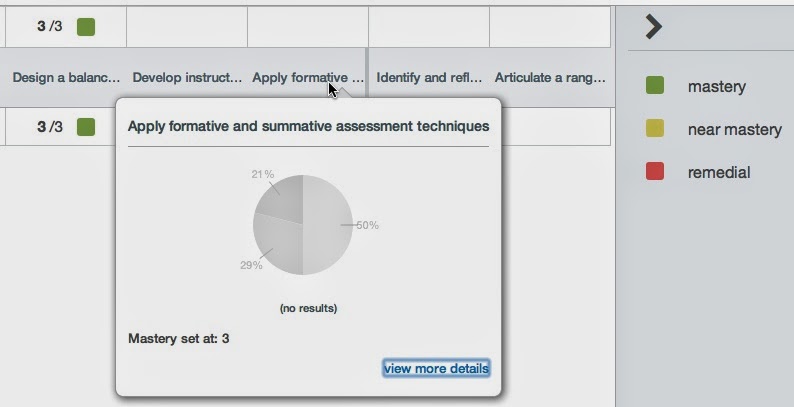
Along with using gamification techniques, I have also transitioned all of my courses to an outcomes-based grading system. Canvas makes it easy to integrate outcomes-based grading into course assignments by giving instructors the option of using the Learning Mastery gradebook instead of a traditional gradebook. Assignments and rubrics are aligned with course learning outcomes. My students and I will be able to track progress toward course outcomes, and grades will be meaningful for both me and my students. Below are the learning outcomes for one of my courses in Canvas. 


Learning Mastery Gradebook in Canvas

I welcome your feedback on my first attempt at gamification and my shift toward outcomes-based grading. Feel free to leave a comment to let me know how you're using these methods in your courses.

Tuesday, July 1, 2014

ISTE 2014 Day 4: Play as learning

This morning I participated in an interactive session about gaming in teacher education. During the session, I was able to download the software for the game, create an avatar, and play in an immersive classroom-based gaming experience for pre-service and new teachers. The game (Quest2Teach) places teachers in a virtual context and allows them to experience authentic challenges they will face in their future or current classrooms. In this immersive environment, teachers face multiple opportunities for real-world decision-making and receive immediate feedback on their choices and actions. The actions and choices made by gamers in Quest2Teach affect how the context responds to them. For example, the clothes chosen by the gamer when designing an avatar will later influence how students behave in the virtual classroom. Decisions about how much time to spend working on a lesson plan, how to respond to a specific student question, and how to respond to feedback from colleagues and supervisors alter the gaming experience and personalize the learning environment for the gamer.

The designers of Quest2Teach explained that immersive environments can help to bridge the gap between theory and coursework in a teacher education program and actual experience in a classroom. Before students are faced with classroom management challenges and critical feedback from a mentor teacher, for instance, immersive environments such as Quest2Teach can provide opportunities for pre-service teachers to face those challenges, take risks, and fail in a safe environment. Further, the immersive classroom helps gamers learn from their mistakes by providing feedback on their actions and teaching through that feedback.

While most pre-service teachers may not be gamers, experiences in immersive games can create a more interactive, authentic learning experience while preparing them for their real work as teachers. And gaming is just plain fun. If you don't believe me, just reflect on how many educators asked you for your networking game code this week.

Image from Quest2Teach gallery


Monday, June 30, 2014

ISTE 2014 Day 3: What should we be doing here?

Many educators are using approaches such as blended and flipped learning to maximize instructional time and increase opportunities for learners to interact with content, with the instructor, and with one another. At the heart of this movement is this question: What is the best use of classroom time? 

If you feel that students should be engaged with tackling authentic challenges during class time, collaborating with one another, and purposefully using available resources, then you may agree that technology can allow you to maximize learning opportunities by putting more static teaching and learning tasks online or moving them outside of the regular school day.

So what I'm wondering today is this: If we believe that student learning happens in interactive, collaborative, and authentic environments, why don't we apply that same thinking to professional learning? We are still learners, after all.

With the abundance of technology we have available for professional learning (just take a look around you at ISTE 2014), we have tremendous opportunities to put static professional learning tasks and resources online and make better use of the time we spend together.

This week, there are roughly 20,000 educators in one building with similar passions and purposes. How often does that happen? How are we using our time, and is that the best use of this time? I see many missed opportunities in the way we could be structuring our professional learning experiences and engaging with one another (here at ISTE 2014 and beyond the conference).

I've talked to several attendees throughout the conference about their best conference experiences, and most them have expressed that the interactive workshops, playgrounds, and poster sessions have been their most amazing learning experiences. Why? Because they were given opportunities to talk with other educators, explore resources, and apply ideas and resources to their own contexts. Kudos to presenters like the Iron Chef crew who are giving conference attendees opportunities to interact with each other and tackle difficult challenges.

P.S. I'm sitting in a lecture session right now as I write this post because I am completely checked out mentally. At ISTE 2015, I will be more purposeful about attending sessions that are explicitly interactive and authentic. I also hope that conference planners will design more opportunities for attendees to engage and play.

ISTE 2014 Day 2: Connecting with other teacher educators

For me, day 2 of the ISTE 2014 conference was all about connecting with other folks who do what I do. One of the most powerful aspects of conferences like this is the opportunity to connect face-to-face with other folks who serve in similar roles, share similar passions, and have innovative ideas they're willing to share.

I had the awesome opportunity to present an interactive panel session with my friends and colleagues Bethany Smith, Dean Mantz, and Lisa Dabbs. We shared strategies and resources we use to engage pre-service teachers, including developing a PLN, using the TPACK framework to make sound instructional technology decisions, developing digital citizenship skills, and blogging. During and after the session, we connected with several teacher educators who are doing this same work in their courses and are interested in sharing ideas and resources and connecting our pre-service teachers with one another. Throughout the day, I was also able to meet up with colleagues who belong to the ISTE Teacher Educator PLN (#tepln). I love making face-to-face connections with other teacher educators I've interacted with online who have been a tremendous resource for me. 

One piece of advice for #iste2014 attendees: Take advantage of opportunities to sit and have a conversation with someone. Don't feel guilty for missing a session to make time for a valuable conversation. There is great value in these connections and conversations, and you never know where those connections may lead. 

Saturday, June 28, 2014

ISTE 2014 Day 1: Authentic and Engaged Learning

My friend Melissa Edwards and I have challenged each other to write a blog post for each day of the ISTE 2014 conference. Today was an amazing first day of the conference for me. I was honored to attend a luncheon where this year's Making IT Happen winners were recognized. It's inspiring to hear stories of educators who are doing the hard work it takes to bring about change in teaching and learning with technology.

The highlight of my day, however, was participating in a thought-provoking conversation with Steven Anderson, Thomas Murray, Beth Still, and Kyle Pace as part of the ClassFlow EDULounge. We talked about what engaged and authentic learning looks like, the role of assessment in learning, and the future of educational technology. I had several take-aways from the conversation, including:

  • Engaged learning is authentic learning. This applies to both teacher learning and student learning. 
  • Teachers need to shift the focus away from allowing a tool to drive the learning toward meaningful uses of technology for specific teaching and learning purposes. 
  • Administrators must align their expectations for teacher evaluation and teacher support with innovative teaching and learning. 
  • Sustained, authentic professional learning opportunities are necessary for teachers to develop fluency with purposeful technology integration. 
As with my ISTE 2013 experience, I am again realizing that the power of conferences is in the conversations. I'm looking forward to the conversations that are in store tomorrow.  

Thursday, May 1, 2014

Why NC Needs the Common Core

I've updated this post, adding new resources to articles in support of and opposition to the CCSS at the end of the post.

Districts and schools across the state have spent enormous amounts of money on providing professional learning opportunities as well as stipends for teachers to work on curriculum alignment, assessment development, and unit and lesson planning. Disregarding this when districts have little to no professional development funding would be the worst kind of stewardship.

Teacher education programs have revised their curricula to prepare future educators for developing students' proficiency with the Common Core State Standards. Graduates from our teacher education programs are in the position to be leaders in curriculum and instruction, perhaps having more exposure to the CCSS in their preparation programs than some in-service teachers. Shifting away from the CCSS would not only harm in-service teachers but also put teacher education graduates at a disadvantage.

The spiraling nature of the Standards for English Language Arts has given teachers at different grade levels a common language to use when discussing teaching and learning. This consistency benefits schools and districts, but more importantly, it benefits students. The CCSS enables teachers to collaborate across grade levels and design a consistent learning experience for students from Kindergarten to 12th grade.

The CCSS, while not perfect (nor is any other set of content standards) aim to develop students' conceptual understandings of mathematics. In the past, many students learned math in procedural ways separated from meaningful contexts and real reasons to do math. When we focus on conceptual understandings, as the CCSS advocate, students are able to understand the "why" behind mathematics. Building a strong conceptual understanding of mathematics in the early grades is paramount. I fear that abandoning the Common Core would signal a return to a focus on procedural mathematics in which students only develop a surface-level understanding.

Student transiency rates are high, and transiency has been linked to decreased student achievement and increased dropout. Having a consistent set of content standards is one way to lessen the negative impacts of student transiency.

Contrary to popular belief, the Common Core is not linked to the devastating practice happening across North Carolina right now known as Read to Achieve. North Carolina has, for years, been assessment-crazed. The CCSS did not change that.

Folks who think the Common Core isn't working due to poor results on standardized assessments obviously don't understand how learning actually happens. You cannot transition to new content standards one year and expect all students to be proficient the next. When NC shifted to the CCSS, many students struggled due to gaps in their understanding, as is to be expected. Students in 5th grade, for example, did not have the benefit of developing strong conceptual mathematical understandings from Kindergarten. Giving up on the CCSS now would only cause another drop in test scores, as students are faced yet again with a transition to a new set of content standards.

The North Carolina Chamber of Commerce expressed that repealing the Common Core "would be such a step backwards that it could adversely impact the hiring of future workers." Read more here.

Don't just take my word for it. Below are links to other articles representing both sides of the Common Core debate. Honestly, I have yet to read a solid case for repealing the standards. The cases being made in opposition to the Common Core focus on implementation, not the standards themselves. If implementation is the issue, then states are to blame, not the standards.

Terry McCann: I Will Not Teach the Common Core

Policy Analysis: North Carolina Should Stay the Course on Common Core

Replacing Common Core to Cost NC More than Millions

Common Core: Pushback Grows in the Tarheel State

NC Should Stay the Course with Common Core